Free Online Fax: Practical Guidance for Businesses and Individuals
Fax technology may feel dated, but many industries still rely on it for legal documents, contracts, and official forms. A free online fax service lets you send and receive faxes without a physical machine, using only an internet connection. This guide walks you through everything you need to know before you choose, set up, or start using a free online fax solution.
What Is a Free Online Fax Service?
A free online fax service is a cloud‑based platform that assigns you a virtual fax number and routes incoming faxes to your email inbox or web dashboard. Outgoing faxes are created from digital documents—PDFs, Word files, or images—and transmitted over the public switched telephone network (PSTN) via the service’s infrastructure. Because the service lives in the cloud, you never need to install a fax machine, buy paper, or maintain toner.
Most providers offer a limited number of pages each month at no cost, making the model ideal for occasional users. When you exceed the free quota, you can either pay per page or upgrade to a paid plan that expands limits and adds premium features. The key benefit is that you retain the legal acceptability of a traditional fax while enjoying the convenience of email and mobile access.
Who Can Benefit From a Free Online Fax?
Even though the average consumer rarely faxes, several professional groups still require a reliable fax channel:
- Real estate agents who need to send signed contracts quickly.
- Healthcare providers submitting insurance claims or patient records.
- Legal professionals delivering court filings or signed agreements.
- Small business owners who must exchange purchase orders with vendors.
For individuals, a free online fax can be useful when signing rental agreements, sending tax documents, or completing government forms that still demand a fax. The flexibility of sending from a laptop or smartphone eliminates the need for a dedicated office space, making it a cost‑effective solution for both remote workers and home‑based entrepreneurs.
Core Features to Look For
When evaluating a free online fax platform, focus on the features that directly impact your workflow. Below are the most common capabilities you’ll encounter:
- Virtual Fax Number: A dedicated number that receives faxes to your email or dashboard.
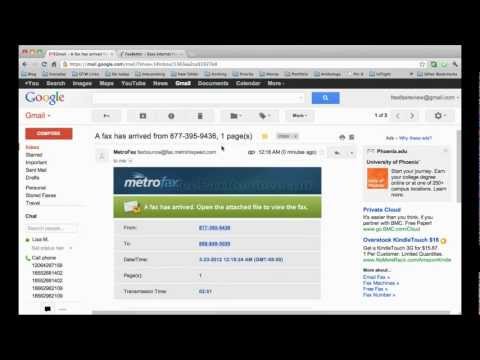
- Email‑to‑Fax and Fax‑to‑Email: Send a fax by emailing a document, and receive incoming faxes as PDF attachments.
- Mobile Apps: iOS and Android apps for on‑the‑go faxing.
- File Format Support: Ability to handle PDFs, DOCX, JPG, PNG, and other common formats.
- Page Limits & Overage Pricing: Clear information on how many free pages are included and the cost per extra page.
Advanced options—such as digital signatures, API access, and multi‑user dashboards—are typically reserved for paid tiers, but they can be worth exploring if your business scales beyond occasional faxing.
Benefits and Limitations of Free Services
The primary benefit of a free online fax is cost savings. You avoid hardware purchases, maintenance contracts, and the recurring expense of paper and toner. Additionally, the digital workflow integrates smoothly with existing document management systems, reducing manual handling and the risk of lost paperwork.
However, free plans come with constraints. Page limits may be as low as 10‑20 pages per month, and support response times can be slower than premium customers receive. Security features such as end‑to‑end encryption may be limited, so it’s essential to verify that the service complies with any industry‑specific regulations (e.g., HIPAA for healthcare). Understanding these trade‑offs helps you decide whether a free tier meets your needs or if an upgrade is justified.
Setting Up a Free Online Fax Account
Getting started is usually a three‑step process:
- Register an Account: Provide your name, email address, and create a password. Some providers may ask for a phone number to verify the virtual fax number.
- Choose a Virtual Fax Number: Select from a list of available local or toll‑free numbers. The number becomes your public fax identity.
- Configure Your Dashboard: Link your email address, set up forwarding preferences, and test the inbound/outbound flow by sending a test fax to a colleague.
After these steps, you can upload documents directly from your computer or mobile device and hit “Send.” Most services also offer a quick tutorial video and a knowledge base to guide new users through common tasks.
Pricing, Limits, and Upgrade Paths
Free online fax providers typically structure their pricing around page quotas. A typical offering might include:
- 5‑20 free outbound pages per month.
- 5‑10 free inbound pages per month.
- Pay‑per‑page rates ranging from $0.05 to $0.10 for additional pages.
If you regularly exceed these limits, consider a paid plan that provides a higher page allowance, a dedicated number, and priority support. Many services also bundle additional features—such as bulk faxing, API access, or advanced security—into their mid‑tier packages. Evaluate your average monthly fax volume and the value of premium features before committing to a subscription.
Integration and Workflow Tips
To maximize efficiency, integrate your free online fax with existing tools. Most platforms support:
- Automatic email forwarding so incoming faxes appear as PDF attachments in a designated mailbox.
- Cloud storage connectors (e.g., Google Drive, Dropbox) that save received faxes directly to your preferred folder.
- Zapier or Integromat integrations for automating actions like creating a new CRM record when a fax arrives.
By routing faxes into your standard document workflow, you eliminate manual downloading and re‑uploading. For example, a real estate office can set up a Zap that saves every incoming lease agreement to a “Leases” folder in Google Drive and notifies the team via Slack.
Security and Reliability Considerations
When sending sensitive information, verify that the service uses TLS encryption for data in transit and stores files on secure, ISO‑27001‑certified servers. Some providers also offer at‑rest encryption and two‑factor authentication for user accounts. While free tiers may lack the most robust security guarantees, they should still meet basic privacy standards.
Reliability is measured by uptime and the speed at which faxes are delivered. Look for providers that publish service level agreements (SLAs) or have a track record of high availability. Customer reviews often highlight whether a service experiences frequent delivery delays or missed inbound faxes, which can be a red flag for mission‑critical use cases.
Comparing Popular Free Online Fax Options
| Service | Free Pages/Month | Paid Upgrade Starting Price | Supported File Types | Mobile App |
|---|---|---|---|---|
| FaxBetter | 20 outbound, 10 inbound | $4.99/month | PDF, DOCX, JPG, PNG, TIFF | iOS & Android |
| eFax Free | 10 outbound, 5 inbound | $9.99/month | PDF, DOC, JPG, PNG | iOS & Android |
| MyFax Lite | 15 outbound, 10 inbound | $7.50/month | PDF, DOCX, JPG, BMP | iOS & Android |
| GotFreeFax | 2 outbound per day (up to 10/month) | Pay‑per‑page $0.10 | PDF, DOC, JPG | Web only |
Each of these services offers a free tier that can handle occasional faxing, but the best fit depends on your specific needs. For example, if you need a mobile app and higher outbound limits, FaxBetter might be the most convenient. If you prefer a pay‑per‑page model without a subscription, GotFreeFax provides a straightforward approach.
Making the Right Choice for Your Business
Start by estimating your monthly fax volume and the types of documents you’ll send. If you rarely fax, a free plan from any of the providers above should suffice. For businesses that need higher security, integration with CRM or cloud storage, or a dedicated support channel, consider moving to a modest paid plan after testing the free tier.
Remember that the goal is to streamline communication, not to add complexity. Choose a service that aligns with your existing workflow, offers reliable delivery, and provides the level of security required for your industry. Once you’ve selected a provider, set up your virtual fax number, integrate with email, and begin replacing paper‑based faxing with a modern, cost‑effective solution.
For more resources on digital communication tools and how they can improve your operations, visit www.prof-informatique.com.
Leave a Reply